This website uses cookies so that we can provide you with the best user experience possible. Cookie information is stored in your browser and performs functions such as recognising you when you return to our website and helping our team to understand which sections of the website you find most interesting and useful.
Description
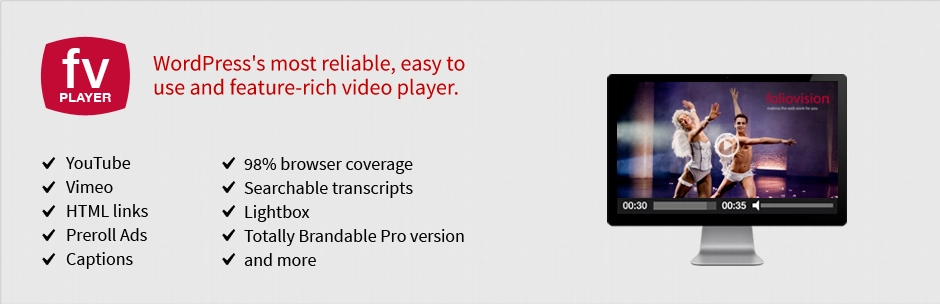
Description Custom HTML 5 video on your own site with Flash fallback for legacy browsers is here. FV Player is a free, easy-to-use, and complete solution for embedding FLV or MP4 videos into your posts or pages. With MP4 videos, FV Player offers 98% coverage even on mobile devices. Remembering video position both both guest users and members API for custom video fields easy AB looped playback for your visitors (great for teaching sites) improved and more powerful playlists (more playlist features coming soon). Automated checking of video encoding for logged in admins FV Player is a completely responsive WordPress video player. Custom start and end screens are built right in. You can use your own custom design before and after the video. Enjoy unlimited instances in a single page. No expensive plugins: unlike other players who nickel and dime you for every feature, with FV Player all advanced features are available in the standard license (Google Analytics, Cuepoints, Native fullscreen, Keyboard shortcuts, Subtitles, Slow motion, Random seeking, Retina ready) Single site pro license available (JW Player requires five pack for full features) Ultra-efficient player: just 181kB of JavaScript and 10kB of Flash code. You can extend FV Player using just HTML and CSS, leaving the JavaScript heavy lifting up to us. 98% Browser coverage. Built-in Flash fallback will get the job done on older browsers while HLS.js library gives you HLS playback on desktop browsers. Full support for Amazon S3, Cloudfront and other CDN’s. Totally Brandable. Stop selling YouTube and start selling yourself. Even design your own player. Supports video intelligence video ads Back to school special 25% off pro licenses until end of September. Additional Technical information Core video engine: open source Flowplayer 7. Supported video formats are MP4, WebM and OGV (read about HTML5 video formats). Supported video streaming formats are HLS (Flash and JavaScript fallback available for incompatible devices), MPEG DASH and RTMP. Default options for all the embedded videos can be set in comprehensive administration menu. In comparison with WordPress Flowplayer plugin, there are several improvements: Allows user to display clickable splash screen at the beginning of video (which not only looks good, but improves the performance significantly). Allows user to display popup box after the video ends, with any HTML content (clickable links, images, styling, etc.) Does not use configuration file, but WordPress Options Does not drive you to use an in-house proprietary CDN but supports all CDN. Includes advanced built-in social sharing. Inexpensive pro support available. Includes an advanced built-in video encoding and theme checker to make sure your videos are encoded properly and your site is set up for video playback.Previous Available Versions
Version- 7.5.35.7212 Download FV Flowplayer Video Player Pro 7.5.35.7212 free with our Membership planHow to Install FV Flowplayer Video Player Pro
- Purchase and download FV Flowplayer Video Player Pro from WPThemesPlug. The ZIP file is available for instant download from your account page.
- Log into your WordPress admin dashboard. Navigate to Plugins → Add New → Upload Plugin and select the downloaded ZIP file. Click Install Now.
- Activate FV Flowplayer Video Player Pro and follow any on-screen setup instructions or setup wizard to configure initial settings.
- Keep your installation updated. New versions appear in your WPThemesPlug account dashboard. Membership holders can install ThemaSafe for automatic updates.
Frequently Asked Questions
Is FV Flowplayer Video Player Pro GPL licensed?
Yes. All products on WPThemesPlug are distributed under the GNU General Public License (GPL), the same open-source license used by WordPress. You can legally use, modify, and install FV Flowplayer Video Player Pro on as many websites as you need.
How do I get updates for FV Flowplayer Video Player Pro?
Updated files are available in your WPThemesPlug account dashboard when new versions are released. Membership holders can install the ThemaSafe plugin for automatic updates directly in WordPress.
Can I use FV Flowplayer Video Player Pro on multiple websites?
Yes. The GPL license allows installation on unlimited websites, including client sites, with no domain restrictions or additional fees.
Are the files safe to use?
Every file on WPThemesPlug is security-scanned for malware and compatibility-tested with the latest WordPress version before being published.
Why Choose WPThemesPlug?
FV Flowplayer Video Player Pro is available at WPThemesPlug under the GPL license for just $5.00. You get instant access to download the complete wordpress plugin immediately after purchase. When new versions are released, updated files appear in your WPThemesPlug account dashboard for manual download. There are no recurring subscription fees for individual purchases.
For broader catalog access, WPThemesPlug offers three membership tiers: Bronze at $14.99, Silver at $29.99, and Gold at $99.99. Members receive the exclusive ThemaSafe auto-update plugin for automatic updates directly from your WordPress dashboard. Every product is security-scanned and compatibility-tested before being made available.
More Information
You can now, Search, Download, Install & Update GPL Themes & Plugins Directly From your WordPress Dashboard with Our Plugin ThemaSafe Plugin.
If an item update isn’t done, request update by indicating the latest version. our agents will follow up and you’ll receive an update notification within the shortest time possible.
Check with support for availability of demo data and child themes.
GPL Notice: This product is distributed under the GNU General Public License (GPL). We are not affiliated with the original developer. Trademarks and brand names belong to their respective owners.
More Products
Download Details
$5.00
Product Information
-
Version:
7.5.35.7212
-
Last Updated:
March 10, 2026
-
Released:
September 23, 2023
-
Price:
$5.00
Get Access to Multi-Downloads from as low as 9.99$
- Multiple Downloads per month
- lifetime updates
- Fast and Regular Updates


You must log in and be a buyer of this download to submit a review.
Leave a reply Cancel reply